
SSO Rajasthan Portal- SSO ID Login, e-Mitra, Jan Aadhaar, Jan Soochna & Recruitment
SSO ID (Single Sign-On) is a free digital identity provided by the Government of Rajasthan as part of its Digital Rajasthan initiative. With a single SSO ID login, citizens can access more than 100 online services, including e-Mitra, Jan Aadhaar, recruitment, scholarships, land records, and pension services. This eliminates the need to create separate accounts for different departments, helping people save valuable time and reduce paperwork.
SSO Rajasthan Portal – All Rajasthan Government Portals
Explore 80+ Rajasthan government portals organized by department for easy access. Each portal card provides a direct link to the respective verified official government website, helping citizens quickly find the services they need through the SSO Rajasthan Portal.
SSO ID: Single Sign On
राजस्थान SSO ID
Jan Aadhaar Portal
जन आधार पोर्टल
e-Mitra Services Portal
ई-मित्र सेवाएं
Bhamashah Portal
भामाशाह पोर्टल
Shala Darpan Portal
शाला दर्पण पोर्टल
Jan Soochna Portal
जन सूचना पोर्टल
What is Rajasthan Portal?
SSO ID Rajasthan Portal refers to the collection of online platforms through which the state government provides digital services to citizens. These portals help people access government schemes, certificates, recruitment services, land records, utility services, and other facilities online.

The main objective of these digital platforms is to reduce paperwork, save time, improve transparency, and make government services easier to access. Depending on the service required, a citizen may need to visit a specific department’s website or use a centralized platform such as Rajasthan SSO.
The services and procedures available on these portals may change from time to time. Therefore, users should always check the latest information on the official government website before submitting an application or making a payment.
Education Department- Rajasthan Portal
Recruitment Rajasthan Portal
राजस्थान भर्ती पोर्टल
Rajasthan Scholarship Portal
राजस्थान स्कॉलरशिप पोर्टल
Higher & Technical Education
उच्च एवं तकनीकी शिक्षा
DCE – College Admission Portal
कॉलेज एडमिशन पोर्टल
SSO Login
राजस्थान SSO लॉगिन
What Is SSO Rajasthan Portal?
SSO Rajasthan refers to Rajasthan Single Sign-On, a digital authentication platform developed to provide convenient access to various Rajasthan Government online services through a single login system.
Once users create an SSO ID, they can sign in to the SSO Rajasthan Portal and access the government services and applications available for their registered account type. The platform is designed for different types of users, including Rajasthan citizens, businesses, and government employees, making it easier to manage multiple online services from one dashboard.
Single Sign-On – SSO Rajasthan Portal Overview
The SSO Rajasthan Portal offers several benefits to both Rajasthan residents and government departments. It provides a centralized platform where users can access multiple online services through a single digital identity. This system helps simplify administrative processes, improve service accessibility, and promote digital governance.
Benefits for Citizens
- Easy Access: Users can access multiple Rajasthan Government services with one SSO ID, eliminating the need to remember separate usernames and passwords for different applications.
- Time-Saving: Many government services can be accessed and completed online, reducing the need for paperwork, long queues, and repeated visits to government offices.
- Secure Login: Authentication and security features help protect users’ personal information and provide a safer way to access online government applications.
- Convenient Accessibility: The portal offers a simple interface that allows citizens to access available government services through internet-enabled devices and authorized service centers.
Benefits for the Government
- Improved Service Delivery: A centralized login system helps government departments manage digital services more efficiently and reduces unnecessary administrative delays.
- Reduced Operational Costs: Online processes minimize paperwork, physical record management, and repetitive data-entry tasks, helping save administrative resources.
- Better Data Management: Digital records and service-related information can support government departments in monitoring performance and improving service planning.
- Transparency and Accountability: Providing online access to government applications helps make service delivery more accessible and encourages greater transparency in administrative processes.
SSO ID Login – Step-by-Step Process
Logging in to your SSO Rajasthan account is a simple process. By following a few easy steps, you can access your account and use the available Rajasthan Government online services.
Steps to Log In to Your SSO ID
- Visit the Official Website: Open your preferred web browser and visit the official SSO Rajasthan Portal at sso.rajasthan.gov.in.
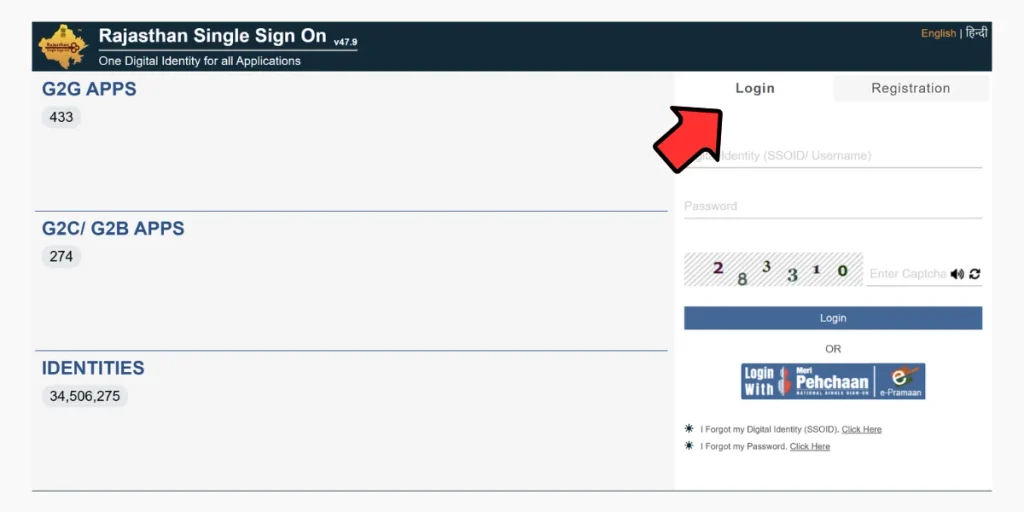
- Enter Your Login Details: On the login page, enter your registered SSO ID, username, or other accepted login credentials along with your password.
- Complete the Login Process: After entering the required information, click the Login button to proceed.
- Access Your Dashboard: If your login credentials are correct, you will be redirected to your personal SSO dashboard, where you can access the government applications and services available to your account.
Services Available on the SSO Rajasthan Portal
The SSO Rajasthan Portal provides access to numerous online services offered by different Rajasthan Government departments. Through a single SSO ID, registered users can access various applications related to employment, education, healthcare, agriculture, transportation, and other important sectors. The available services may vary depending on the user’s account category and eligibility.
Government Services
- Employment Services: Apply for government job vacancies, check application status, access recruitment-related information, and receive employment notifications.
- Education Services: Access admission-related applications, scholarship services, examination information, results, and other educational facilities.
- Healthcare Services: Find information about government health schemes, healthcare facilities, medical services, and other available health-related applications.
- Financial Services: Access services related to Bhamashah, e-Mitra, online bill payments, and other government financial facilities.
- Land Record Services: Use available online applications for land-related information, property records, registration, and mutation services.
- Transport Services: Access vehicle registration, driving licence-related applications, permits, and other transport department services.
- Police Services: Find police-related online facilities, complaint services, application tracking, and other available citizen services.
- Revenue Services: Access property tax information, land revenue facilities, and other revenue department applications.
- Social Welfare Services: Find information about pension schemes, social security benefits, and various government welfare programmes.
- Agriculture Services: Explore farmer-related schemes, agricultural subsidies, loan information, and other agriculture department facilities.
Other Online Services
- e-Governance: Access different government portals, digital applications, and citizen-focused online facilities from a centralized platform.
- e-Learning: Find educational resources, online learning opportunities, skill development programmes, and other study-related facilities.
- e-Commerce: Access supported digital marketplace applications and online commercial services.
- e-Library: Explore digital books, educational materials, and other online reading resources.
Specialized Government Services
Apart from general citizen services, the SSO Rajasthan Portal also provides access to various specialized government applications, including:
- Arms Licence Services: Access supported online application facilities and check the status of arms licence-related requests.
- Building Plan Approval System (BPAS): Use digital facilities for submitting and processing building plan approval applications.
- Disaster Management: Find emergency-related information, important alerts, and available disaster management resources.
- Drug Licence Services: Access supported facilities for drug licence applications, renewals, and related activities.
- GST Services: Access available GST-related applications and facilities for registration, tax returns, and other business requirements.
- Litigation Tracking: Check information about legal cases and monitor their progress through supported online applications.
- Circuit House Management System: Access online facilities related to circuit house reservations and management.
Important: The SSO Rajasthan Portal works as a centralized access platform for government applications. Not every service is available to all users. Access depends on the relevant department, registered account category, and applicable eligibility requirements.
SSO ID Rajasthan Registration Process
Creating an SSO ID Rajasthan account is a simple online process. Residents and other eligible users can register through the official Rajasthan SSO Portal by providing the required information and completing the identity verification process. Follow the steps below to create your new SSO ID.
Steps to Create a New SSO ID Rajasthan
- Visit the Official Website: Open your web browser and visit the official Rajasthan SSO Portal at https://sso.rajasthan.gov.in/.
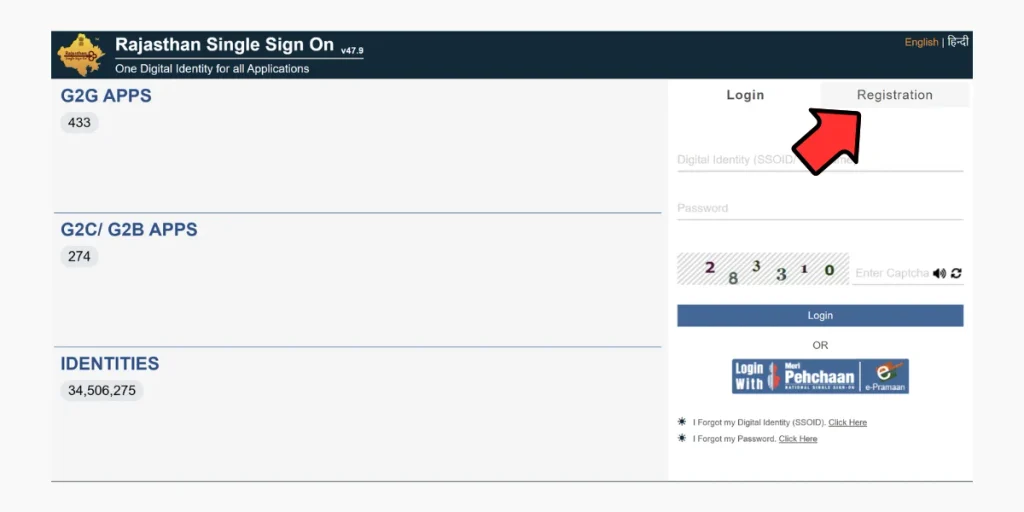
- Select the Registration Option: On the homepage, click on the Register or Registration option to open the new user registration page.
- Choose Your Registration Category: Select the appropriate registration category, such as Citizen, Udhyog, or Government Employee, depending on your eligibility.
- Enter the Required Details: Provide the information requested on the registration form. Depending on your selected category, this may include:
- Full Name
- Mobile Number
- Email Address
- Aadhaar or Jan Aadhaar Details
- Create Your Password: Set a strong password for your account by following the security requirements displayed on the registration page.
- Verify Your Information: Complete the required verification process. This may involve OTP confirmation, Aadhaar or Jan Aadhaar authentication, or another supported verification method.
- Submit Your Registration: Review the information you have entered and submit the registration form. After successful verification, your SSO ID will be generated or linked to your selected registration details.
Eligibility Criteria for SSO ID Rajasthan Registration
Before applying for an SSO ID Rajasthan, users should understand the basic eligibility requirements and registration conditions. The Rajasthan SSO Portal offers different registration options for citizens, businesses, and government employees. The required details may vary depending on the selected account category.
The general eligibility requirements include:
- Citizenship and Residency: Rajasthan residents can register as citizens and access the government services available to their accounts. Certain registration categories may also be available to other eligible users.
- Age Requirements: Applicants should meet the age conditions applicable to the particular government service they want to access. There is no universal minimum age of 18 years for creating every type of SSO account.
- Required Documents: Users may need Aadhaar Card, Jan Aadhaar Card, or other accepted identification or registration details, depending on their registration category.
- Contact Information: An active mobile number and email address may be required for account registration, OTP verification, and important notifications.
- Identity Verification: Applicants must provide valid information and complete the verification process using the authentication methods supported by the portal.
- Business or Employee Details: Users registering under the Udhyog or Government Employee category may need additional business registration or employment-related information.
By meeting the applicable requirements, eligible users can create an SSO ID and access the online government applications available through the Rajasthan SSO Portal.
Benefits of SSO Rajasthan Portal
The SSO Rajasthan Portal provides several advantages by bringing different government applications together under one digital login system. It makes accessing online services easier for citizens, businesses, and government employees.
Some of the major benefits are explained below:
- Simple Login System: Users can access multiple supported government applications with a single SSO ID and password instead of maintaining separate login credentials for every portal.
- Saves Time: The centralized login facility reduces the need to repeatedly enter different usernames and passwords when switching between supported government services.
- Account Security: Authentication and verification features help protect user accounts and personal information from unauthorized access.
- Multiple Services in One Place: Users can access various government applications, including e-Mitra, PHED, Jan Aadhaar-related services, and other departmental facilities, depending on their eligibility.
- Easy Service Management: The centralized dashboard makes it convenient to find and manage different government applications from one location.
- Online Accessibility: Citizens can use available services through internet-enabled devices without having to visit multiple government websites or offices for every online task.
- Digital Governance: The portal supports government digital initiatives by simplifying access to departmental applications and encouraging the use of online services.
How to Merge Duplicate SSO ID Rajasthan Accounts?
Sometimes, users accidentally create multiple SSO ID Rajasthan accounts using different registration methods, such as Google or Jan Aadhaar. Having duplicate accounts may cause difficulties while accessing certain government services, applying for recruitment opportunities, or using other online facilities.
- Log In to the Duplicate SSO Account: Visit the official SSO Rajasthan Portal and sign in using the temporary or duplicate SSO ID that you want to deactivate or manage.
- Open Edit Profile: After logging in, navigate to the top-right corner of your dashboard and click on the Edit Profile option to access your account settings.
- Select Deactivate Account: Look for the Deactivate Account option in your profile settings and review the available instructions carefully.
- Follow the Required Instructions: If the portal provides an account merging or duplicate account management option, select the appropriate option and follow the instructions displayed on the screen.
- Complete OTP Verification: Enter the OTP or other verification details requested by the portal to confirm your identity and authorize the account-related action.
- Check Your Account Status: After completing the process, follow the portal’s confirmation instructions and verify whether the duplicate account has been successfully deactivated or managed.
Services Available Through SSO Rajasthan Portal
Different Rajasthan government portals provide different types of services. Some common categories of online services include:
- SSO registration and login
- Government recruitment applications
- Government scheme information
- Jan Aadhaar-related services
- e-Mitra services
- Online certificates and applications
- Scholarship-related services
- Utility bill payments
- Land record information
- Application status tracking
- Online government forms
- Public information services
- Department-specific digital services
The exact services available on a particular portal depend on the concerned government department and may be updated periodically.
Conclusion
The Rajasthan Portal can be understood as the wider network of online government platforms and digital services available to residents of Rajasthan. Platforms such as Rajasthan SSO, e-Mitra, Jan Aadhaar, Jan Soochna Portal, Rajasthan Recruitment Portal, and Apna Khata serve different purposes and help citizens access government services more conveniently.
Whether you need information about a government scheme, want to apply for a recruitment opportunity, access land records, use an e-Mitra service, or access other digital facilities, it is important to use the correct official portal.
Frequently Asked Questions (FAQs)
What is the SSO Rajasthan Portal?
The SSO Rajasthan Portal is a broad term used for the online government services and digital platforms provided by the Government of Rajasthan. It helps citizens access information and services from different departments online.
What is the SSO Rajasthan Portal?
The SSO Rajasthan Portal is a Single Sign-On platform that allows users to access multiple Rajasthan government services and applications using a single SSO ID and password.
What services are available through the SSO Rajasthan Portal?
Depending on the user’s account and available services, the SSO Rajasthan Portal can provide access to various government applications and services, including e-Mitra-related services, recruitment, scholarships, and other online facilities.
How can I create an SSO ID in Rajasthan?
To create an SSO ID, visit the official Rajasthan SSO platform and complete the registration process using the required details. Follow the instructions provided on the official portal.
Can I use one SSO ID for multiple government services?
Yes. The primary purpose of Single Sign-On is to allow users to access multiple supported government applications and services through one account instead of maintaining separate login credentials for each service.
What is the difference between Rajasthan Portal and SSO Rajasthan Portal?
Rajasthan Portal is a general term that can refer to the state’s collection of online government services and portals. SSO Rajasthan Portal is a specific Single Sign-On platform designed to provide access to multiple supported services through one login.
Can I access Rajasthan government recruitment services through SSO?
Yes, certain recruitment-related services and applications may be accessible through SSO. Candidates should always check the latest recruitment notification and the official recruitment portal for current application instructions.
What should I do if I forget my SSO ID password?
If you forget your SSO password, use the password recovery or reset option available on the official SSO Rajasthan Portal and follow the verification steps provided.
Can I update my details in the SSO account?
Depending on the type of information, some account details may be updated through the available account settings or relevant official process. Users should follow the instructions provided by the official portal.
Is SSO required for every Rajasthan government service?
No. Not every government service necessarily requires an SSO login. The requirement depends on the specific department, service, or application you are trying to access.
Can I access the Rajasthan Portal from a mobile phone?
Yes, many Rajasthan government online services can be accessed using a smartphone and a compatible web browser. Some services may work better on a desktop or laptop depending on the portal’s design and requirements.
Is the Rajasthan Portal available 24 hours a day?
Online portals are generally accessible at any time, but certain services may be temporarily unavailable because of maintenance, technical issues, or scheduled updates.
How can I identify the official Rajasthan government portal?
Always verify the website domain and check that you are using an official government website before entering personal information or making payments. Avoid relying on unofficial websites that imitate government portals.
Is my SSO login information safe?
Users should keep their SSO ID, password, and OTP confidential. Never share these details with anyone and avoid entering them on unknown or suspicious websites.
Can I use SSO ID Rajasthan Portal to access e-Mitra services?
Some e-Mitra-related services may be available through the Rajasthan SSO ecosystem. The exact services and access methods can change, so users should check the official portal for current information.
Why is my SSO ID Rajasthan Portal login not working?
Login problems can occur due to incorrect credentials, browser issues, internet connectivity, or temporary technical maintenance. Check your login details, try the password recovery option if necessary, and use the official support options when required.
Can I check government schemes through the Rajasthan Portal?
Yes, Rajasthan’s online government ecosystem includes platforms that provide information about various government schemes, welfare programs, eligibility requirements, and public services.
Do I need separate accounts for every Rajasthan government department?
Not necessarily. The SSO system is designed to provide a single login for multiple supported applications and services. However, some departments or services may still have their own registration or login requirements.